A browser step is a picture of the page at one instant: the moment you release the mouse button on a click. For most applications that instant still shows the page you were looking at before the click, which is exactly what a step should show. The result of the click then appears in the next step, because that is where you clicked next.
Some applications react the moment the mouse button goes down. They switch the panel, put up a Loading message and only then go and fetch the data. By the time the button comes up and the picture is taken, the panel has already changed and the data has not arrived yet. The step is a faithful capture of the page at that instant. The data was never on the page to be captured.
Nothing is wrong with the capture, the project or the export. Waiting longer between clicks does not help either, because the next click switches the panel again before its own picture is taken. The fix is a recording habit, described below.
A real example
Cisco APIC is one application that behaves this way. In the real interface, clicking Bridge Domains and then VRFs in the tenant tree shows the configured object, named test here, in the centre panel.
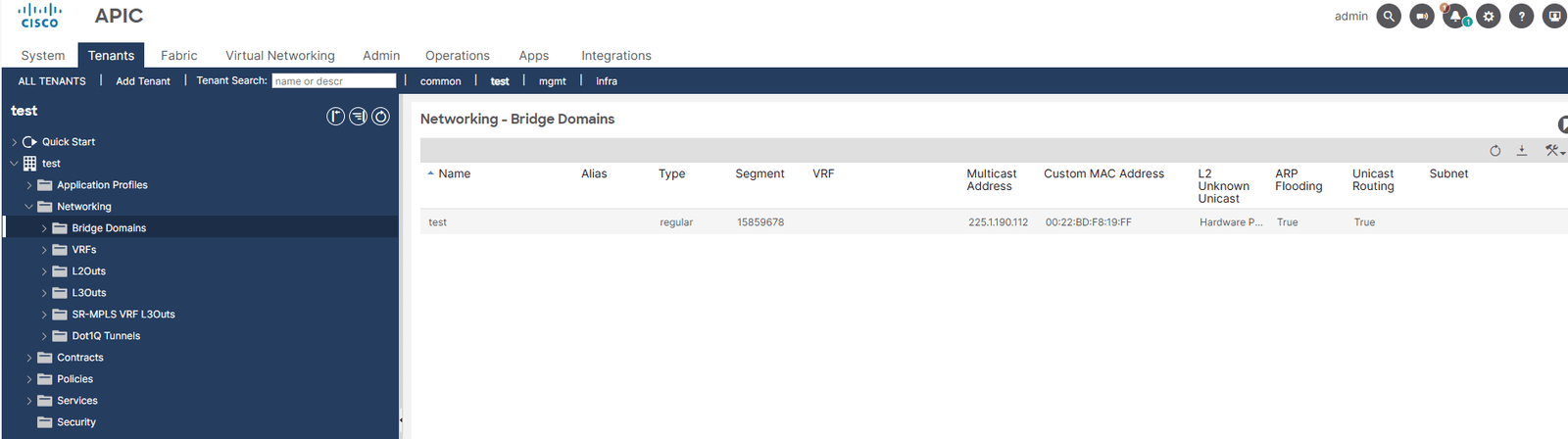
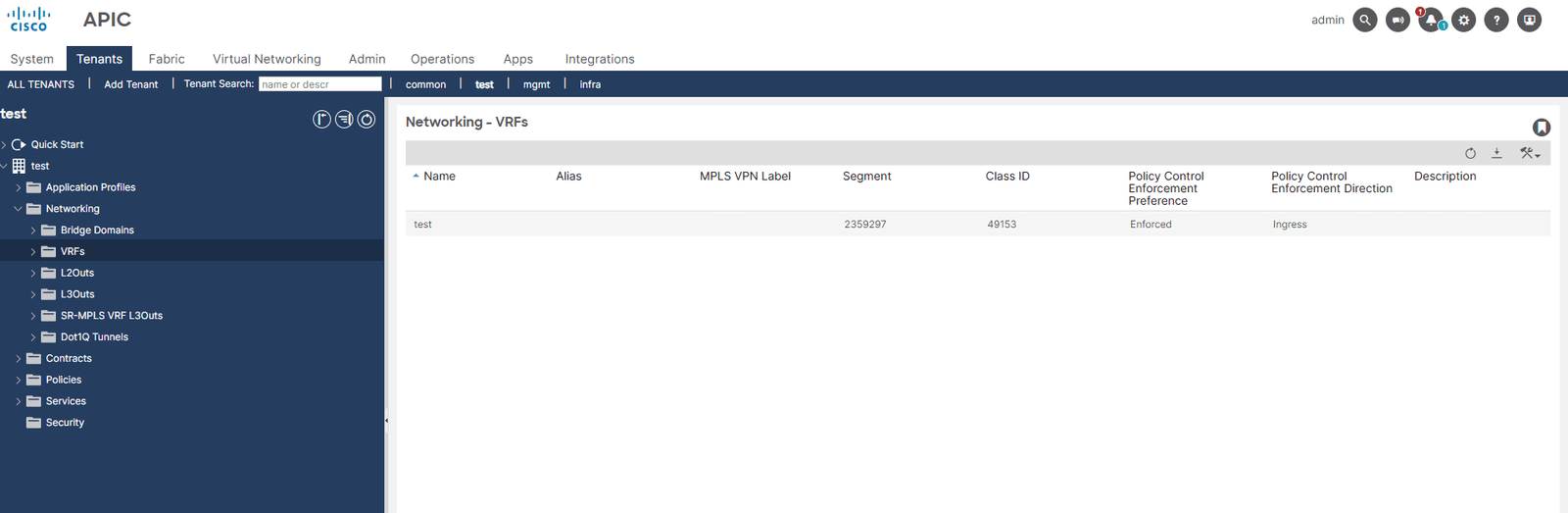
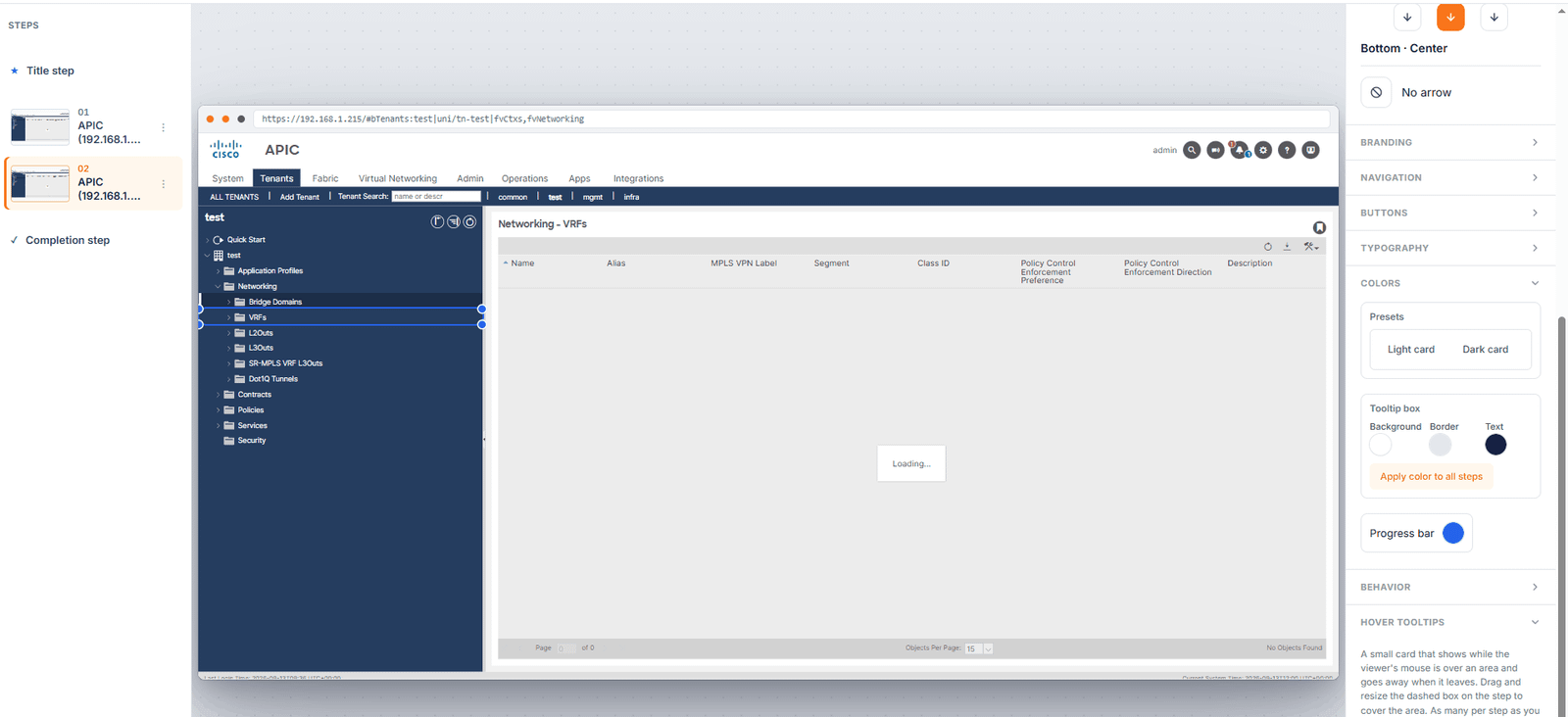
The same two clicks, recorded with the extension, produce steps whose centre panel says Loading. The panel title has already switched to the item that was clicked, the table underneath is empty, and the footer reads No Objects Found. The step looks the same in the editor, in Preview and in the exported demo, because the captured page is the same in all three.
The fix: one extra click inside the loaded panel
Give the data a step of its own. After each click that loads a panel, wait for the data, then click something harmless inside that panel before moving on. That second click captures the page with the data in it.
- Click the sidebar item as you normally would. This step will show the panel loading. That is expected.
- Wait until the data is on screen.
- Click something inside the loaded panel that does not navigate or open anything: the panel title, a column header, or the row itself. This step shows the panel with your data.
- Move on to the next sidebar item and repeat.
The habit in one line: every click that loads a panel gets a follow-up click inside the loaded panel. Two clicks per screen instead of one.
In the APIC example that means: click Bridge Domains, wait for the row, click the Networking - Bridge Domains title, then click VRFs, wait for the row, click the Networking - VRFs title. Four steps arrive in the editor instead of two, and the second and fourth show the data.
Tidy up in the editor
You now have pairs of steps: the loading step, then the loaded step. Keep the loaded ones.
- Delete the loading step from the step list. Its picture adds nothing.
- Move the target on the loaded step. It sits on whatever harmless thing you clicked, such as the panel title. Drag it onto the control the viewer should click next, for example the next item in the tree, and write the tooltip for that. The viewer sees the data and is pointed at the next click in the same step.
- If a step is there to explain the data rather than to point at a control, turn the target off and let the tooltip's Back and Next buttons carry it.
Which applications need this
Any application where the panel changes before you let go of the mouse. There is a quick way to tell. Press and hold the mouse button on a sidebar item without releasing it. If the centre panel changes while you are still holding, the application reacts on press and needs the follow-up click. If nothing changes until you release, it does not, and ordinary recording pacing is enough.
The same applies to a panel that loads slowly for any reason. If the data is not on screen when you click the next item, it is not in the next step. Wait for it, give it its own click, then move on.
Next: Troubleshooting · Record a browser demo · All documentation